What you need
- A JDK, Java 17 or newer. HttpClient is part of it, so there is no dependency to add.
- An API key from the dashboard, in an environment variable rather than in the source.
- A free account, if you do not have one: 100 screenshots a month, no card.
Create the key on the API keys page. It is shown once, at creation, so store it before closing the dialog, and keep it on the server: a key in an Android app is readable by everyone who has the app.
The request
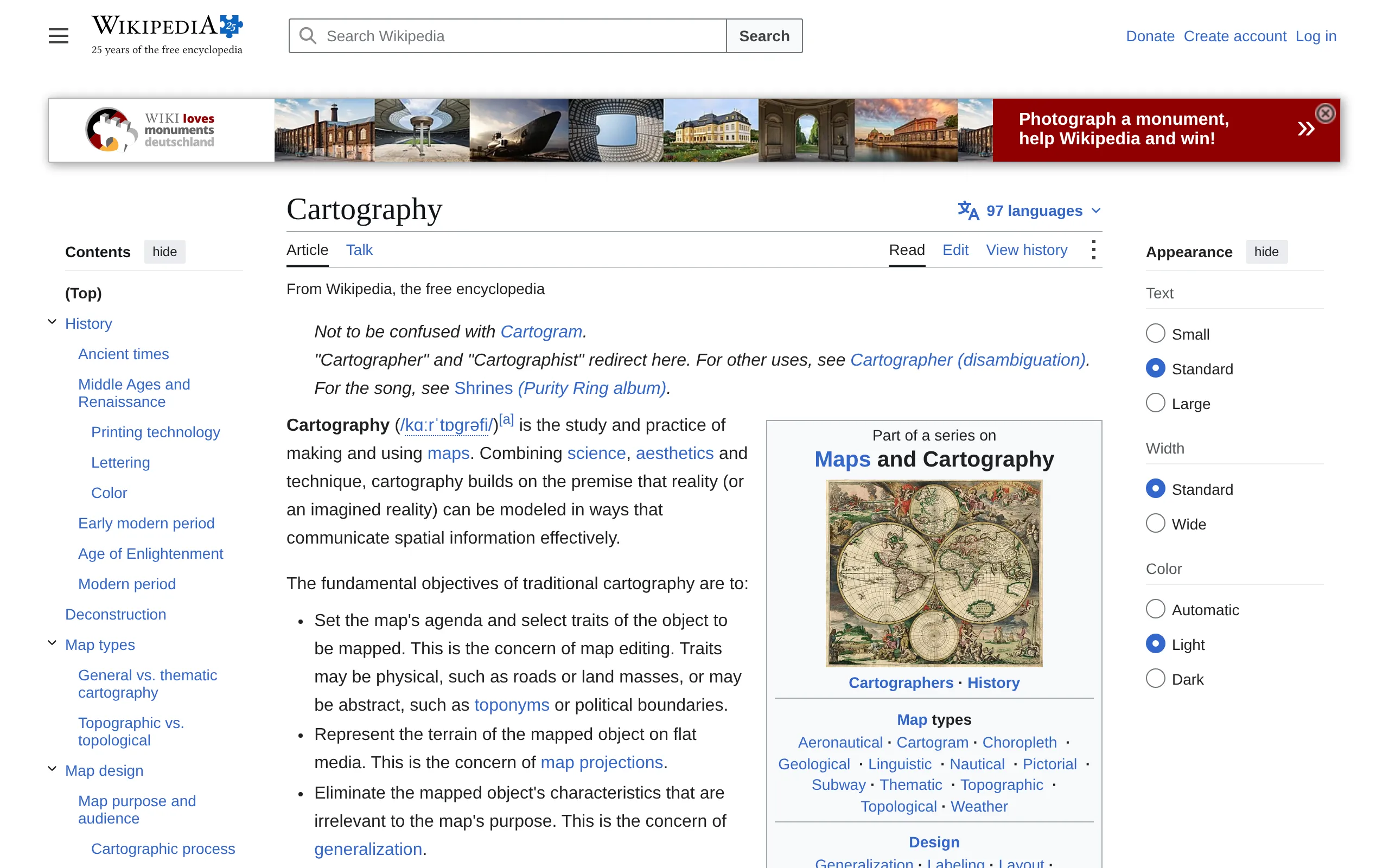
Save this as Screenshot.java. It asks for one page at a 1280 × 800 viewport, at twice the pixel density, as WebP, and writes what comes back to a file:
// Screenshot.java: request one screenshot and save it. Run: java Screenshot.java
import java.net.URI;
import java.net.URLEncoder;
import java.net.http.HttpClient;
import java.net.http.HttpRequest;
import java.net.http.HttpResponse;
import java.nio.charset.StandardCharsets;
import java.nio.file.Files;
import java.nio.file.Path;
import java.time.Duration;
import java.util.List;
import java.util.Map;
import java.util.stream.Collectors;

public class Screenshot {
    public static void main(String[] args) throws Exception {
        List<Map.Entry<String, String>> params = List.of(
            Map.entry("url", "https://en.wikipedia.org/wiki/Cartography"),
            Map.entry("format", "webp"),
            Map.entry("quality", "80"),
            Map.entry("viewport_width", "1280"),
            Map.entry("viewport_height", "800"),
            Map.entry("device_scale_factor", "2"));

        String query = params.stream()
            .map(p -> URLEncoder.encode(p.getKey(), StandardCharsets.UTF_8) + "="
                + URLEncoder.encode(p.getValue(), StandardCharsets.UTF_8))
            .collect(Collectors.joining("&"));

        HttpRequest request = HttpRequest.newBuilder(URI.create("https://api.urlshot.io/v1/screenshot?" + query))
            .header("Authorization", "Bearer " + System.getenv("URLSHOT_API_KEY"))
            .timeout(Duration.ofSeconds(60))
            .build();

        HttpResponse<byte[]> response = HttpClient.newHttpClient()
            .send(request, HttpResponse.BodyHandlers.ofByteArray());

        // Anything that is not an image is the JSON error envelope, reported whole:
        // its code, message and requestId are all in it.
        if (response.statusCode() != 200) {
            throw new IllegalStateException(new String(response.body(), StandardCharsets.UTF_8));
        }

        Files.write(Path.of("screenshot.webp"), response.body());
        System.out.println("Wrote screenshot.webp");
    }
}
Run it
export URLSHOT_API_KEY=sk_your_key_here
java Screenshot.java
One render, one credit. Java compiles the file in memory and runs it; in a project, the same code goes in any method.
What comes back
BodyHandlers.ofByteArray() gives you the image itself: no JSON wrapper, no base64. This is the file that program writes:
Every response also carries headers that account for the call:
| X-Request-ID | Opaque identifier for this request. Quote it in any support conversation. |
|---|---|
| X-Urlshot-Cache | HIT when the image was served from cache, MISS when it was rendered, BYPASS when cache_ttl was 0. |
| X-Urlshot-Credits-Used | Render credits consumed by this request. A cache hit consumes zero. |
| X-RateLimit-Limit | Renders your plan may run at once. |
| X-Urlshot-Renderer | The renderer build that produced the image, such as v4:4572cafff9ea; on a cache hit, the build that made the cached image. For support conversations, not for branching on. |
| X-RateLimit-Remaining | Render slots still free after this request. Absent on a cache hit, where it is unknown rather than zero. |
| Cache-Control | How long a browser may reuse the image: private, max-age=<seconds> when cache_ttl is set, and on a cache hit no longer than the cached copy has left; no-store when cache_ttl is 0. |
firstValue returns an Optional, and matches a name whatever its case:
// After the request: what it cost, and how to refer to it. Header names are
// matched whatever their case.
String credits = response.headers().firstValue("X-Urlshot-Credits-Used").orElseThrow(); // "1", or "0" from cache
String requestId = response.headers().firstValue("X-Request-ID").orElseThrow();
System.out.println("request " + requestId + " used " + credits + " credit(s)");
Errors and retries
A failed call returns JSON instead of an image, with a stable code, a message, and the requestId to quote if you ask about it. The JDK has no JSON parser, so these programs put the whole envelope in the exception; with Jackson or Gson in your project, read the three fields from it instead.
These codes are worth retrying, and each comes with a Retry-After header in seconds:
concurrency_limit_exceeded, 429: The workspace is already running the maximum number of concurrent renders.rate_limit_exceeded, 429: The request rate limit for this API key has been exceeded.service_unavailable, 503: The screenshot service is temporarily unavailable.
Every other code fails the same way however often you send it, and one that got as far as the browser has already cost a credit. So retry on Retry-After and nothing else:
import java.net.URI;
import java.net.URLEncoder;
import java.net.http.HttpClient;
import java.net.http.HttpRequest;
import java.net.http.HttpResponse;
import java.nio.charset.StandardCharsets;
import java.nio.file.Files;
import java.nio.file.Path;
import java.time.Duration;
import java.util.List;
import java.util.Map;
import java.util.stream.Collectors;
import java.util.Optional;

public class Retry {
    /** Requests a screenshot, retrying only when the API says how long to wait. */
    static byte[] screenshot(List<Map.Entry<String, String>> params, int attempts) throws Exception {
        String query = params.stream()
            .map(p -> URLEncoder.encode(p.getKey(), StandardCharsets.UTF_8) + "="
                + URLEncoder.encode(p.getValue(), StandardCharsets.UTF_8))
            .collect(Collectors.joining("&"));
        HttpRequest request = HttpRequest.newBuilder(URI.create("https://api.urlshot.io/v1/screenshot?" + query))
            .header("Authorization", "Bearer " + System.getenv("URLSHOT_API_KEY"))
            .timeout(Duration.ofSeconds(60))
            .build();

        for (int attempt = 1; ; attempt++) {
            HttpResponse<byte[]> response = HttpClient.newHttpClient()
                .send(request, HttpResponse.BodyHandlers.ofByteArray());
            if (response.statusCode() == 200) return response.body();

            // Only a 429 or 503 carries Retry-After, in seconds. Anything else fails
            // the same way however often it is sent.
            Optional<String> retryAfter = response.headers().firstValue("Retry-After");
            if (retryAfter.isEmpty() || attempt == attempts) {
                throw new IllegalStateException(new String(response.body(), StandardCharsets.UTF_8));
            }
            Thread.sleep(Long.parseLong(retryAfter.get()) * 1000);
        }
    }

    public static void main(String[] args) throws Exception {
        byte[] image = screenshot(List.of(
            Map.entry("url", "https://en.wikipedia.org/wiki/Cartography"),
            Map.entry("format", "webp")), 4);
        Files.write(Path.of("screenshot.webp"), image);
        System.out.println("Wrote screenshot.webp");
    }
}
An HttpRequest is immutable, so the same one is sent again on each attempt. Every code is in the error reference.
More options
Every option is a query parameter with a default. These change a capture the most:
| full_page | Capture the full scrollable page instead of only the viewport. | boolean |
|---|---|---|
| format | Output image format. | png | jpeg | webp |
| quality | Encoder quality for jpeg and webp. Defaults to 80 for those formats and must be omitted for png. | 1–100 |
| viewport_width | Viewport width in CSS pixels. | 200–3840 |
| device_scale_factor | Device pixel ratio to emulate. | 0.5–3 |
| dark_mode | Emulate prefers-color-scheme: dark before navigation. | boolean |
| hide_selectors | CSS selector whose matching elements are hidden after navigation. Repeatable. | string[] |
| block_cookie_banners | Hide known consent dialogs and restore page scrolling before capturing. Available on every plan. | boolean |
The programs keep their parameters in a List of Map.entry pairs rather than a Map: a map cannot hold hide_selectors twice, and a list keeps the order you wrote. URLEncoder encodes each name and value:
import java.net.URI;
import java.net.URLEncoder;
import java.net.http.HttpClient;
import java.net.http.HttpRequest;
import java.net.http.HttpResponse;
import java.nio.charset.StandardCharsets;
import java.nio.file.Files;
import java.nio.file.Path;
import java.time.Duration;
import java.util.List;
import java.util.Map;
import java.util.stream.Collectors;

public class Options {
    public static void main(String[] args) throws Exception {
        // A list is the parameter repeated: one entry for each selector.
        List<Map.Entry<String, String>> params = List.of(
            Map.entry("url", "https://en.wikipedia.org/wiki/Atlas"),
            Map.entry("full_page", "true"),
            Map.entry("format", "png"),
            Map.entry("hide_selectors", ".vector-header-container"),
            Map.entry("hide_selectors", ".mw-footer"));

        String query = params.stream()
            .map(p -> URLEncoder.encode(p.getKey(), StandardCharsets.UTF_8) + "="
                + URLEncoder.encode(p.getValue(), StandardCharsets.UTF_8))
            .collect(Collectors.joining("&"));

        HttpRequest request = HttpRequest.newBuilder(URI.create("https://api.urlshot.io/v1/screenshot?" + query))
            .header("Authorization", "Bearer " + System.getenv("URLSHOT_API_KEY"))
            .timeout(Duration.ofSeconds(60))
            .build();

        HttpResponse<byte[]> response = HttpClient.newHttpClient()
            .send(request, HttpResponse.BodyHandlers.ofByteArray());

        // Anything that is not an image is the JSON error envelope, reported whole:
        // its code, message and requestId are all in it.
        if (response.statusCode() != 200) {
            throw new IllegalStateException(new String(response.body(), StandardCharsets.UTF_8));
        }

        Files.write(Path.of("atlas.png"), response.body());
        System.out.println("Wrote atlas.png");
    }
}
That is the whole Atlas article as a PNG, without Wikipedia's header and footer. URLEncoder writes a space as +, which the API reads as a space, as it should in a query string. All 17 options are in the parameter reference.
POST with a JSON body
The same options can go in a JSON body, which is easier once you send CSS: nothing to encode. A text block holds the JSON as written, with JSON's own true and arrays — a string "true" is rejected in a body:
import java.net.URI;
import java.net.http.HttpClient;
import java.net.http.HttpRequest;
import java.net.http.HttpResponse;
import java.nio.charset.StandardCharsets;
import java.nio.file.Files;
import java.nio.file.Path;
import java.time.Duration;

public class Post {
    public static void main(String[] args) throws Exception {
        // A text block keeps the JSON as written: true rather than "true",
        // and a list as an array.
        String body = """
            {
              "url": "https://en.wikipedia.org/wiki/Atlas",
              "full_page": true,
              "format": "png",
              "hide_selectors": [
                ".vector-header-container",
                ".mw-footer"
              ],
              "custom_css": "#siteNotice { display: none !important }"
            }
            """;

        HttpRequest request = HttpRequest.newBuilder(URI.create("https://api.urlshot.io/v1/screenshot"))
            .header("Authorization", "Bearer " + System.getenv("URLSHOT_API_KEY"))
            .header("Content-Type", "application/json")
            .timeout(Duration.ofSeconds(60))
            .POST(HttpRequest.BodyPublishers.ofString(body))
            .build();

        HttpResponse<byte[]> response = HttpClient.newHttpClient()
            .send(request, HttpResponse.BodyHandlers.ofByteArray());

        // Anything that is not an image is the JSON error envelope, reported whole:
        // its code, message and requestId are all in it.
        if (response.statusCode() != 200) {
            throw new IllegalStateException(new String(response.body(), StandardCharsets.UTF_8));
        }

        Files.write(Path.of("atlas.png"), response.body());
    }
}
For a body built from your own values, let Jackson or Gson write it from a record or a map rather than formatting the string. Put every option in the body: a POST that also has query parameters is rejected. The rest of the rules are under POST with a JSON body.
In a Spring Boot app
In a Spring Boot app, call the API from a controller and send the image on, so the key never reaches a browser. RestClient, Spring's synchronous client since Spring Boot 3.2, does the request:
// PreviewController.java, in a Spring Boot app with the web starter.
package com.example.demo;

import java.net.URI;
import java.time.Duration;
import java.util.Map;
import org.slf4j.Logger;
import org.slf4j.LoggerFactory;
import org.springframework.beans.factory.annotation.Value;
import org.springframework.http.CacheControl;
import org.springframework.http.HttpStatus;
import org.springframework.http.ResponseEntity;
import org.springframework.web.bind.annotation.GetMapping;
import org.springframework.web.bind.annotation.PathVariable;
import org.springframework.web.bind.annotation.RestController;
import org.springframework.web.client.RestClient;
import org.springframework.web.client.RestClientResponseException;
import org.springframework.web.util.UriComponentsBuilder;

@RestController
public class PreviewController {
    private static final Logger log = LoggerFactory.getLogger(PreviewController.class);

    // The pages this app shows previews of. Visitors pick a name, never an
    // address: a route that took any URL would render any page on your credits.
    private static final Map<String, String> PAGES = Map.of(
        "home", "https://example.com",
        "atlas", "https://en.wikipedia.org/wiki/Atlas");

    private final RestClient urlshot;

    public PreviewController(@Value("${URLSHOT_API_KEY}") String apiKey) {
        this.urlshot = RestClient.builder()
            .defaultHeader("Authorization", "Bearer " + apiKey)
            .build();
    }

    @GetMapping("/previews/{page}")
    public ResponseEntity<byte[]> preview(@PathVariable String page) {
        String url = PAGES.get(page);
        if (url == null) return ResponseEntity.notFound().build();

        URI uri = UriComponentsBuilder.fromUriString("https://api.urlshot.io/v1/screenshot")
            .queryParam("url", "{url}")
            .queryParam("viewport_width", 1280)
            .queryParam("format", "webp")
            .queryParam("cache_ttl", 3600)
            .encode()
            .buildAndExpand(url)
            .toUri();

        try {
            ResponseEntity<byte[]> response = urlshot.get().uri(uri).retrieve().toEntity(byte[].class);
            return ResponseEntity.ok()
                .contentType(response.getHeaders().getContentType())
                .cacheControl(CacheControl.maxAge(Duration.ofSeconds(3600)).cachePublic())
                .body(response.getBody());
        } catch (RestClientResponseException e) {
            // The body is the JSON error envelope: its code and requestId say what happened.
            log.error("urlshot.io refused a preview: {}", e.getResponseBodyAsString());
            return ResponseEntity.status(HttpStatus.BAD_GATEWAY).build();
        }
    }
}- Visitors choose a name, not an address. A route that rendered whatever URL it was given would let anyone spend your credits on pages of their own.
- The address is encoded as a value.
queryParam("url", "{url}")withencode()andbuildAndExpandencodes the page's own&and=, which building the string by hand would not. - Repeat views are free.
cache_ttl=3600serves the same page from cache for an hour at no cost, the longest the free plan allows. See caching and credits. - A failure is logged, not passed on.
RestClientthrows on an error status; the controller logs the envelope and answers502.
@Value("${URLSHOT_API_KEY}") reads the environment variable, since Spring treats the environment as properties. Run ./mvnw spring-boot:run and open /previews/home on port 8080, the Spring Boot default.
Signed URLs
To put a capture straight into a page's <img>, sign the URL on your server instead. Anyone can load a signed URL, and changing any of its parameters breaks the signature:
// Java 17 or later, for HexFormat. No dependencies.
import java.net.URLEncoder;
import java.nio.charset.StandardCharsets;
import java.util.HexFormat;
import java.util.LinkedHashMap;
import java.util.Map;
import java.util.stream.Collectors;
import javax.crypto.Mac;
import javax.crypto.spec.SecretKeySpec;

public class SignedUrl {
    static String signedUrl(Map<String, String> options) throws Exception {
        Map<String, String> params = new LinkedHashMap<>();
        params.put("key", System.getenv("URLSHOT_KEY"));
        params.putAll(options);

        String query = params.entrySet().stream()
            .map(e -> URLEncoder.encode(e.getKey(), StandardCharsets.UTF_8) + "="
                + URLEncoder.encode(e.getValue(), StandardCharsets.UTF_8))
            .collect(Collectors.joining("&"));

        Mac mac = Mac.getInstance("HmacSHA256");
        mac.init(new SecretKeySpec(
            System.getenv("URLSHOT_SIGNING_SECRET").getBytes(StandardCharsets.UTF_8), "HmacSHA256"));
        String signature = HexFormat.of().formatHex(mac.doFinal(query.getBytes(StandardCharsets.UTF_8)));

        return "https://api.urlshot.io/v1/screenshot?" + query + "&signature=" + signature;
    }

    public static void main(String[] args) throws Exception {
        Map<String, String> options = new LinkedHashMap<>();
        options.put("url", "https://example.com");
        options.put("viewport_width", "1200");
        System.out.println(signedUrl(options));
    }
}
URLSHOT_KEY is a publishable key (pk_…) and URLSHOT_SIGNING_SECRET its signing secret, both from the dashboard. HexFormat, new in Java 17, writes lowercase hex, which is what the API compares. A signed URL does not expire, so add a cache_ttl to any you publish; the reference explains why under signed URLs.
Where to go next
- The API reference — every parameter, response header and error code, generated from the contract the gateway validates against.
- Visual regression testing — capturing pages before and after a deployment, and failing the build when they differ.
- Pricing — what a credit costs once the free allowance runs out.