Visual regression testing with a screenshot API.
Capture your pages in the same browser, at the same size, before and after every deployment. When the two images differ, something on the page moved, and your build can fail before a user notices.
urlshot.io takes the screenshots. The comparison runs in your CI with an image-diff library, and this page gives you the script.
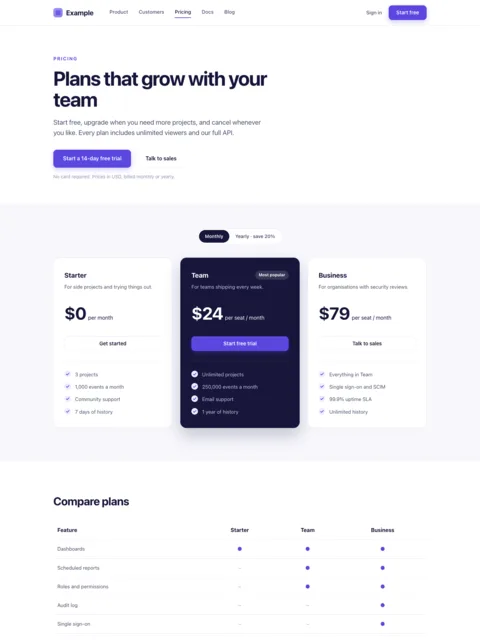
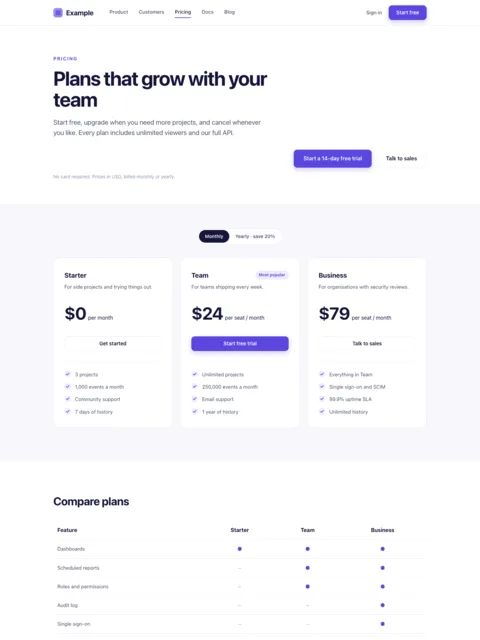
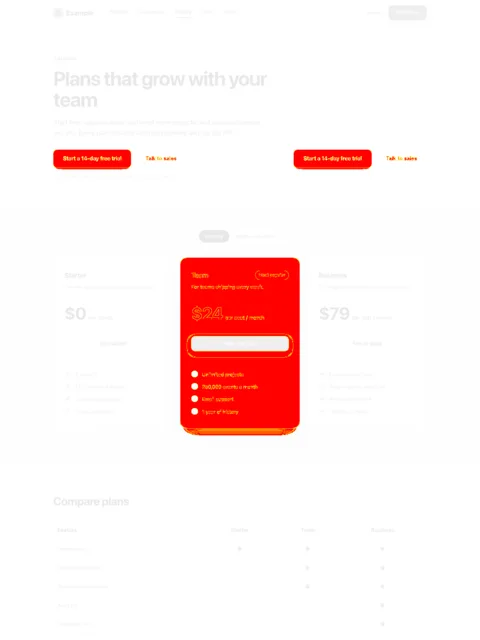
pricing-1440.png: 192533 pixels changedexit 1
Catch visual bugs before users do.
A deployment can pass every check and still change how a page looks. Unit tests check logic; end-to-end tests check behaviour, such as whether the sign-up button still submits the form. Neither notices that the button moved.
Spacing
A shared component’s padding changes, and every page that uses it shifts by a few pixels.
Fonts
A web font fails to load after a path change. Headings fall back to a system face and wrap onto a second line.
Buttons
A global style change restyles a button that nobody meant to touch.
Layout
A row of cards loses its wrapping and overflows, but only at one breakpoint.
Missing assets
A build step changes an image path, and the hero shows a broken image instead of a product shot.
CSS order
The bundler emits stylesheets in a new order, and a rule that used to lose now wins.
A visual regression workflow.
- Your codeBaselineApproved captures, committed with your code
- Your codeDeployA preview or staging build
- urlshot.ioNew captureSame pages, same options
- Your codeImage diffpixelmatch in your CI job
- Your codePass or failFail the build, attach the diff
The baseline is a set of screenshots someone has looked at and approved. Every run takes new screenshots of the same pages with the same options, and compares each one with its baseline, pixel by pixel.
When a change is intended, such as a redesign or a new section, the comparison shows it, someone approves it, and the new screenshots become the baseline. They are committed with the code change that caused them, so the pull request shows both.
Capture consistent screenshots.
A comparison is only useful if two screenshots of an unchanged page are exactly the same. These options keep them the same from run to run. The parameter reference has their ranges and defaults.
viewport_width, viewport_height- The layout. Responsive CSS follows the viewport width, so test each breakpoint you care about as its own capture.
device_scale_factor- How sharp the image is. Keep it the same in every run: 1 is enough to catch layout changes; 2 also catches small details, in images four times the size.
full_page=true- The whole page, so a change further down is caught too. If the page gets taller or shorter, that is reported as a change on its own.
format=png- Lossless, so every difference you see is on the page, not caused by image compression.
wait_until, delay_ms- When the screenshot is taken: after the page stops loading, plus an optional extra wait for anything that arrives late.
custom_css- Stop animations, transitions and the blinking text cursor, which would otherwise make any two screenshots differ.
hide_selectors- Remove what changes by itself: dates, counters, rotating testimonials, a live-chat widget.
dark_mode=true- The dark theme, as its own set of captures and baselines.
The same browser every time
Screenshots taken on a laptop and in CI differ even when the page has not changed, because each machine has its own fonts and browser build. That is why screenshot tools often keep a separate baseline for each operating system. Every urlshot.io capture is taken with the same Chromium and the same fonts, whoever asks and from wherever.
When urlshot.io updates that browser, rendering can shift slightly and every baseline may need refreshing at once. Each response names the build that produced it in X-Urlshot-Renderer. Keep it with your baselines, and when every page differs at once, check it before hunting for a CSS change.
What it does not emulate
There is no user-agent or touch emulation: a capture is a desktop Chromium at the viewport you ask for. Responsive CSS follows the viewport width, so breakpoints work as expected, but a site that detects phones by their user agent shows its desktop version.
There is no GPU either. Content drawn with WebGL shows its fallback, as the rendering environment describes.
Run it in CI.
The script below takes screenshots of 3 pages at 2 widths on the deployment you name, and compares each one with its baseline. Here it is in 4 parts, one step at a time. The whole file is at the end, to copy in one go.
1. Settings
The deployment to check, read from
PREVIEW_URL; the pages and widths to compare; and CSS that stops animations, so that two screenshots of an unchanged page match exactly.visual-check.mjs, part 1 of 4// visual-check.mjs: compare a preview deployment with approved screenshots. // npm install pixelmatch pngjs import { existsSync } from 'node:fs'; import { mkdir, readFile, writeFile } from 'node:fs/promises'; import pixelmatch from 'pixelmatch'; import { PNG } from 'pngjs'; const site = process.env.PREVIEW_URL; // the deployment to check const pages = ['/', '/pricing', '/signup']; const widths = [1440, 390]; // desktop and phone // Stops animations and the blinking text cursor, so that two screenshots // of an unchanged page are exactly the same. const freeze = `*, *::before, *::after { animation: none !important; transition: none !important; caret-color: transparent !important; }`;2. Take a screenshot
One request for each page and width. The options are sent as a JSON body, so the CSS needs no URL encoding. If a screenshot fails, the run stops with the error code and the request id.
visual-check.mjs, part 2 of 4// Takes a full-page PNG of the url at the given width. async function capture(url, width) { const response = await fetch('https://api.urlshot.io/v1/screenshot', { method: 'POST', headers: { Authorization: `Bearer ${process.env.URLSHOT_API_KEY}`, 'Content-Type': 'application/json', }, body: JSON.stringify({ url, viewport_width: width, full_page: true, format: 'png', wait_until: 'networkidle0', custom_css: freeze, }), }); if (!response.ok) { const { error } = await response.json(); throw new Error(`${url}: ${error.code} (request ${error.requestId})`); } return Buffer.from(await response.arrayBuffer()); }3. Compare it with the baseline
pixelmatch counts the pixels that differ, and draws them in red in a third image, saved in
diffs/. Two images of different sizes can’t be compared pixel by pixel, so a page that got taller or shorter is reported as a change on its own.visual-check.mjs, part 3 of 4// Compares a screenshot with its baseline. Returns what changed, or null if // nothing did, and saves the changes as an image. async function compare(baselineFile, screenshot, diffFile) { const before = PNG.sync.read(await readFile(baselineFile)); const after = PNG.sync.read(screenshot); // Images of different sizes can't be compared pixel by pixel; keep the new one. if (before.width !== after.width || before.height !== after.height) { await writeFile(diffFile, screenshot); return `size changed from ${before.width}×${before.height} to ${after.width}×${after.height}`; } // Count the pixels that differ, and draw them in red in a third image. const diff = new PNG({ width: after.width, height: after.height }); const changed = pixelmatch(before.data, after.data, diff.data, after.width, after.height, { threshold: 0.1, // how different one pixel must be to count, from 0 to 1 }); if (changed === 0) return null; await writeFile(diffFile, PNG.sync.write(diff)); return `${changed} pixels changed`; }4. Check every page
The first run has nothing to compare with, so it saves each screenshot in
baselines/. Every later run compares, and exits with code 1 if anything changed, which fails the CI job. To approve an intended change, delete that page’s baseline and run the script again.visual-check.mjs, part 4 of 4// Check every page at every width. The first run saves the baselines. await mkdir('baselines', { recursive: true }); await mkdir('diffs', { recursive: true }); let failed = false; for (const page of pages) { for (const width of widths) { const name = `${page === '/' ? 'home' : page.slice(1)}-${width}.png`; // e.g. pricing-1440.png const screenshot = await capture(new URL(page, site).href, width); if (!existsSync(`baselines/${name}`)) { await writeFile(`baselines/${name}`, screenshot); console.log(`${name}: saved as the baseline`); continue; } const change = await compare(`baselines/${name}`, screenshot, `diffs/${name}`); if (change) { console.error(`${name}: ${change}, see diffs/${name}`); failed = true; } else { console.log(`${name}: unchanged`); } } } process.exitCode = failed ? 1 : 0;
The whole script in one file
// visual-check.mjs: compare a preview deployment with approved screenshots.
// npm install pixelmatch pngjs
import { existsSync } from 'node:fs';
import { mkdir, readFile, writeFile } from 'node:fs/promises';
import pixelmatch from 'pixelmatch';
import { PNG } from 'pngjs';

const site = process.env.PREVIEW_URL; // the deployment to check
const pages = ['/', '/pricing', '/signup'];
const widths = [1440, 390]; // desktop and phone

// Stops animations and the blinking text cursor, so that two screenshots
// of an unchanged page are exactly the same.
const freeze = `*, *::before, *::after {
  animation: none !important;
  transition: none !important;
  caret-color: transparent !important;
}`;
// Takes a full-page PNG of the url at the given width.
async function capture(url, width) {
  const response = await fetch('https://api.urlshot.io/v1/screenshot', {
    method: 'POST',
    headers: {
      Authorization: `Bearer ${process.env.URLSHOT_API_KEY}`,
      'Content-Type': 'application/json',
    },
    body: JSON.stringify({
      url,
      viewport_width: width,
      full_page: true,
      format: 'png',
      wait_until: 'networkidle0',
      custom_css: freeze,
    }),
  });

  if (!response.ok) {
    const { error } = await response.json();
    throw new Error(`${url}: ${error.code} (request ${error.requestId})`);
  }
  return Buffer.from(await response.arrayBuffer());
}
// Compares a screenshot with its baseline. Returns what changed, or null if
// nothing did, and saves the changes as an image.
async function compare(baselineFile, screenshot, diffFile) {
  const before = PNG.sync.read(await readFile(baselineFile));
  const after = PNG.sync.read(screenshot);

  // Images of different sizes can't be compared pixel by pixel; keep the new one.
  if (before.width !== after.width || before.height !== after.height) {
    await writeFile(diffFile, screenshot);
    return `size changed from ${before.width}×${before.height} to ${after.width}×${after.height}`;
  }

  // Count the pixels that differ, and draw them in red in a third image.
  const diff = new PNG({ width: after.width, height: after.height });
  const changed = pixelmatch(before.data, after.data, diff.data, after.width, after.height, {
    threshold: 0.1, // how different one pixel must be to count, from 0 to 1
  });
  if (changed === 0) return null;

  await writeFile(diffFile, PNG.sync.write(diff));
  return `${changed} pixels changed`;
}
// Check every page at every width. The first run saves the baselines.
await mkdir('baselines', { recursive: true });
await mkdir('diffs', { recursive: true });
let failed = false;

for (const page of pages) {
  for (const width of widths) {
    const name = `${page === '/' ? 'home' : page.slice(1)}-${width}.png`; // e.g. pricing-1440.png
    const screenshot = await capture(new URL(page, site).href, width);

    if (!existsSync(`baselines/${name}`)) {
      await writeFile(`baselines/${name}`, screenshot);
      console.log(`${name}: saved as the baseline`);
      continue;
    }

    const change = await compare(`baselines/${name}`, screenshot, `diffs/${name}`);
    if (change) {
      console.error(`${name}: ${change}, see diffs/${name}`);
      failed = true;
    } else {
      console.log(`${name}: unchanged`);
    }
  }
}

process.exitCode = failed ? 1 : 0;- Baselines live in the repository, in
baselines/, so an approved change and its new screenshots are reviewed in the same pull request as the code. - The deployment must be public. The renderer cannot reach
localhostor your CI runner’s network: point it at a preview or staging URL. - One screenshot at a time, which stays within every plan’s limit on parallel renders. This run takes 6 screenshots, so it costs 6 credits.
- The capture step, not a test framework. urlshot.io takes the screenshots. Keeping baselines, comparing and approving happen in the script and your repository.
In a GitHub Actions workflow
Run it after the job that deploys the pull request’s preview, and keep the diffs when it fails:
# A job in the workflow that deploys your pull request's preview.
  visual-check:
    needs: deploy-preview
    runs-on: ubuntu-latest
    steps:
      - uses: actions/checkout@v4 # the repository, with baselines/ committed
      - uses: actions/setup-node@v4
        with:
          node-version: 22
      - run: npm install pixelmatch pngjs
      - run: node visual-check.mjs
        env:
          # However your deploy job publishes the preview's address.
          PREVIEW_URL: ${{ needs.deploy-preview.outputs.url }}
          URLSHOT_API_KEY: ${{ secrets.URLSHOT_API_KEY }}
      - uses: actions/upload-artifact@v4
        if: failure()
        with:
          name: visual-diffs
path: diffs/What to test.
Landing and marketing pages
The most-visited pages, built from the most shared components, where a global CSS change shows first.
Sign-up and login forms
The public forms every customer passes through: labels, error states, buttons, third-party sign-in buttons.
Pricing and the start of checkout
Plan tables and the public pages before payment, where a misaligned price or a hidden button costs money.
Responsive layouts
Each important page at the widths you support. Most layout regressions appear at one breakpoint, not all of them.
Dark mode
With dark_mode=true, the dark theme gets baselines of its own. Low-contrast text and invisible borders hide there.
Documentation and content
Long pages assembled from tables, code blocks and callouts, where one component change ripples through hundreds of pages.
Visual regression testing questions.
What is screenshot-based visual regression testing?
It compares screenshots of your pages from before a change with screenshots from after it. Approved captures are the baseline; each new build is captured the same way and compared pixel by pixel. Any difference means the page looks different, whether or not any test of its behaviour failed.
How can I compare website screenshots after a deployment?
Capture each page of the new deployment with exactly the options the baseline used, then compare the two images with an image-diff library such as pixelmatch. It counts the changed pixels and draws them in red. The script above does both and fails when anything changed.
Can a screenshot API be used in CI/CD?
Yes, as long as the deployment it captures is publicly reachable, such as a preview or staging URL. The CI job calls the API over HTTPS, so the runner needs no browser installed. Each capture costs one credit; the example checks 6 captures per run.
Why not use Playwright’s own screenshot assertions?
Use them for anything behind a login, which this API cannot reach. An API helps when you want every capture taken with the same browser and fonts, whichever machine asks, without installing a browser in CI. It also tests the deployed site as visitors get it, with its CDN and real assets.
Can it capture localhost or a page behind a login?
No. The renderer loads public http and https addresses as an anonymous visitor: private and local addresses return target_not_allowed, and there is no option to send cookies or headers. Test a preview or staging deployment instead.
Related use cases.
Website monitoring
Capture the same pages on a schedule and keep every image, so you can see when a page changed and what it looked like before.
AI agents
Give a vision model the page as a browser renders it: layout, charts and dialogs that extracted text leaves out.
Or see every use case, or the same requests in your own language in the code examples.
Add screenshots to your test workflow.
100 free screenshots a month: enough to set up the check and run it on your first pull requests.