Website screenshots for AI agents.
Give an AI agent the page as a browser renders it. urlshot.io loads a URL in Chromium, runs its scripts, and returns a screenshot a vision model can read: layout, charts, dialogs and all.
Screenshots complement the HTML and text an agent already reads; they do not replace them. This page covers when each is the right input, and how to wire a capture into an agent.
1 · Capture
https://api.urlshot.io/v1/screenshot?url=https://stripe.com&viewport_width=1024&hide_selectors=[data-testid=notifications-shell]
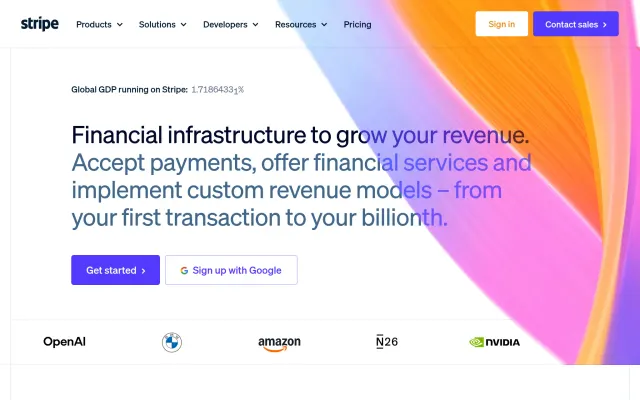
2 · Ask a vision model
Does anything on this page look broken: overlapping text, missing images, unstyled content?
3 · Act on the answer
{
  "broken": false,
  "evidence": "Header, headline and buttons render with their styles; nothing overlaps."
}
Give AI systems visual access to the web.
Most agents read the web as text: they fetch a page’s HTML, strip the markup and pass what is left to a language model. That works for an article. It misses everything that exists only once a browser has drawn the page.
Content rendered by scripts
A single-page app’s HTML is often an empty shell until its JavaScript runs. A plain HTTP fetch sees the shell; a browser sees the app.
What is actually visible
Text in the HTML may be collapsed, hidden or covered by a dialog. A screenshot shows what a person on the page can read.
Charts
A chart drawn on a canvas keeps its numbers as pixels, not text. A vision model can read the axes and the trend.
Layout and hierarchy
Which button is the primary action, what sits above the fold, what a visitor’s eye lands on first.
Visual errors
Overlapping text, a broken image, a page whose stylesheet failed to load. The HTML looks fine; the page does not.
urlshot.io renders each page in Chromium with its JavaScript, web fonts and lazy-loaded content. There is no GPU, so a chart drawn with WebGL shows its fallback; 2D canvas and SVG charts render. The rendering environment lists the rest.
Why screenshots matter to multimodal models.
A screenshot is the right input when the question is visual, and the wrong one when the text already answers it. The question decides:
| The agent asks | Better input | Why |
|---|---|---|
| What does this article say? | Text | Cheaper to read, and quotable exactly. |
| Which links are on the page? | HTML | A screenshot shows link text, not where the links go. |
| What does the Pro plan cost? | Text, then a screenshot | The text, if the price is in it; a screenshot if a script or an image draws it. |
| Is anything covering the content? | Screenshot | Dialogs and overlays are layout, not text. |
| Does the page look broken? | Screenshot | Broken layout and missing images are only visible when drawn. |
| What does this chart show? | Screenshot | A canvas chart has no text to read. |
Images cost more than text
A model spends more reading an image than a short passage, and cannot quote it exactly. When the text answers the question, send the text.
Keep captures screen-sized
Vision models read an image up to a maximum size: 2576 pixels on the long edge for current Claude models. A full-page capture thousands of pixels tall has to shrink to fit, and small text does not survive. Capture one screen, or cut a tall capture into screen-sized pieces.
Hide what is not the page
block_cookie_banners=true keeps the consent dialog out of the capture, so the model reads the page rather than the banner. Leave it off when the dialog is what you are asking about.
Send both when you can
A screenshot with the page’s text gives the model exact values to quote and the layout to reason about.
An example agent workflow.
- Your codeAgent needs a lookA question only the rendered page answers
- urlshot.ioCaptureOne screen, as a JPEG
- Your codeVision modelThe screenshot and the question
- Your codeStructured answerJSON the agent can branch on
- Your codeNext stepReport, retry, alert or carry on
Capture a page and ask a model about it
The screenshot is one 1280 × 800 screen as a JPEG: a small file, and still readable at the size the model sees it. This example sends it to Claude with the Anthropic SDK; any model that accepts an image works the same way. It asks for a JSON answer, so the agent’s next step can check a field instead of interpreting a paragraph.
// npm install @anthropic-ai/sdk
import Anthropic from '@anthropic-ai/sdk';

const question =
  'Does anything on this page look broken: overlapping text, missing images, unstyled content? ' +
  'Reply with JSON only: {"broken": true or false, "evidence": "one sentence"}';

// 1. Take a screenshot: one screen of the page, small enough for the model to read in full.
const params = new URLSearchParams({
  url: 'https://example.com',
  viewport_width: '1280',
  viewport_height: '800',
  format: 'jpeg',
  quality: '80',
  block_cookie_banners: 'true',
});

const capture = await fetch(`https://api.urlshot.io/v1/screenshot?${params}`, {
  headers: { Authorization: `Bearer ${process.env.URLSHOT_API_KEY}` },
});

if (!capture.ok) {
  const { error } = await capture.json();
  throw new Error(`${error.code}: ${error.message} (request ${error.requestId})`);
}

const screenshot = Buffer.from(await capture.arrayBuffer()).toString('base64');

// 2. Send the screenshot and the question to the model.
const client = new Anthropic(); // reads ANTHROPIC_API_KEY
const message = await client.beta.messages.create({
  model: 'claude-opus-5-5',
  max_tokens: 16000,
  // If this model declines to answer, the API asks a fallback model in the same call.
  betas: ['server-side-fallback-2026-07-01'],
  fallbacks: 'default',
  messages: [
    {
      role: 'user',
      content: [
        { type: 'image', source: { type: 'base64', media_type: 'image/jpeg', data: screenshot } },
        { type: 'text', text: question },
      ],
    },
  ],
});

// 3. Read the answer.
if (message.stop_reason === 'refusal') throw new Error('The model declined to answer.');
const answer = message.content.find((block) => block.type === 'text')?.text;
console.log(answer); // {"broken": false, "evidence": "..."}
Example applications.
Visual QA agents
After every deployment, look at the key pages and report anything that looks broken, in words a person can act on.
Competitor research
Read competitors’ landing and pricing pages as visitors see them, and summarise their positioning, plans and calls to action.
Web monitoring agents
Describe what changed between yesterday’s capture and today’s in a sentence, rather than as a count of changed pixels.
Accessibility review assistance
Flag likely problems for a person to check, such as low-contrast text or tiny tap targets. It assists a review; it is not an accessibility audit.
Design review
Compare a page with its design guidelines: spacing, type, colour and the components it uses.
Visual verification
Confirm that a publish, a deployment or a content change produced the page it was meant to, before telling anyone it is done.
The scheduled side of these agents works like website screenshot monitoring, and the deploy-time side like visual regression testing, with a model in place of the pixel diff.
Use it as an agent tool.
Agent frameworks let a model call functions you write. A screenshot tool needs one input, the URL, and returns the image. This definition is in the format the Anthropic Messages API uses; other frameworks call the schema parameters.
Your function calls the screenshot API with the URL, and the full-page setting if the model set it, and returns the image as the tool’s result. The description matters most: it tells the model when a screenshot is better than reading the HTML.
{
  "name": "screenshot_page",
  "description": "Capture a public web page as a browser renders it and return the image. Use it when layout, charts, dialogs or anything visual matters; read the HTML instead when only the text does.",
  "input_schema": {
    "type": "object",
    "properties": {
      "url": {
        "type": "string",
        "description": "Absolute http or https URL of a public page."
      },
      "full_page": {
        "type": "boolean",
        "description": "Capture the whole page instead of the first screen. Long pages lose detail."
      }
    },
    "required": ["url"]
  }
}
MCP
urlshot.io does not publish an MCP server. The API is one HTTPS request, so it wraps into a tool like this one, or into an MCP server of your own, in a few lines.
Screenshots for AI agents: questions.
Why would an AI agent need website screenshots?
Because some answers exist only once a browser has drawn the page: content rendered by scripts, what a dialog covers, a chart on a canvas, whether the layout is broken. Extracted text has none of that. A screenshot gives a vision model the page a visitor sees.
Can vision models analyze website screenshots?
Yes. Multimodal models read text in an image, describe layout, and answer questions about what is shown, provided the image is legible at the size the model reads it. Keep captures to one screen, such as 1280 × 800, rather than a full page thousands of pixels tall.
When should an agent use HTML versus screenshots?
Use the text or HTML when the question is about content, since it is cheaper and exact, and it is the only source for things like link targets. Use a screenshot when the question is visual: layout, overlays, charts, errors. Many agents send both. See which input answers which question.
Is there an MCP server for urlshot.io?
No. The API is one HTTPS request, so it wraps into a tool for your agent framework, or into an MCP server of your own, in a few lines. The tool definition above is a starting point.
Can the agent capture a page behind a login?
No. The renderer loads public pages as an anonymous visitor, in a fresh browser with no cookies, and cannot send headers or sign in. An agent that needs a logged-in session needs a browser automation tool of its own.
Related use cases.
Website monitoring
Capture the same pages on a schedule and keep every image, so you can see when a page changed and what it looked like before.
Visual regression testing
Capture your pages before and after a deployment in the same browser, and fail the build when something moved that should not have.
Or see every use case, or the same requests in your own language in the code examples.
Give your AI agent visual web access.
100 free screenshots a month to prototype with. No card needed.