Website thumbnail API.
Send a URL, get back a preview image of the page. urlshot.io opens it in a real Chromium browser, waits for it to render, and returns a PNG, JPEG or WebP sized for a thumbnail.
For directory listings, bookmarks, CRM records and dashboards: anywhere a site’s name reads better with a picture of the site beside it.
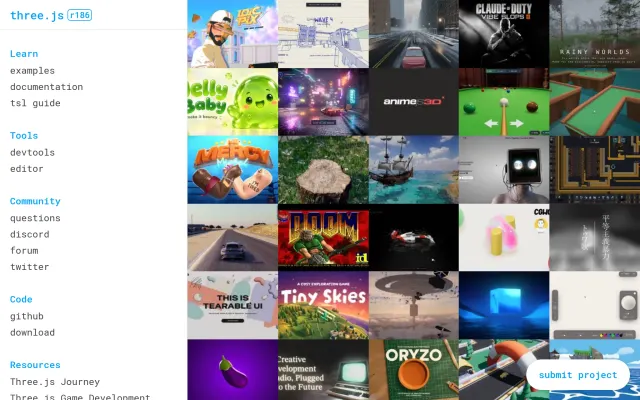
three.js
threejs.orgLibrary
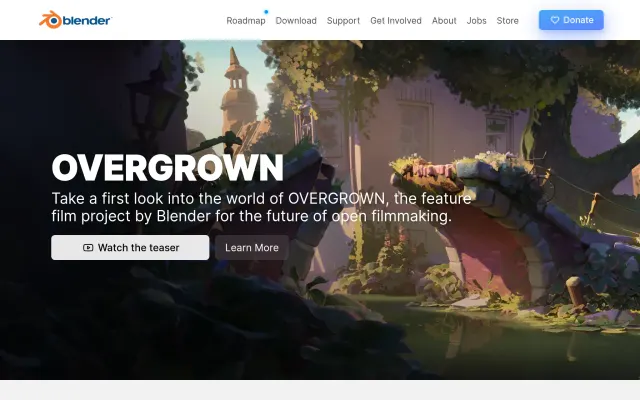
Blender
blender.org3D software

Stripe
stripe.comPayments

Art Institute of Chicago
artic.eduMuseum
Generate website thumbnails from any URL.
A website thumbnail is a screenshot of a page, taken at desktop size and shown small. The hard part is taking it: loading the page, running its scripts, and waiting for its fonts and images. That is what the API does. Where you keep the image afterwards is up to you.
- Your codeA URLSubmitted by a user, or read from your database
- urlshot.ioAPI requestGET or POST /v1/screenshot
- urlshot.ioChromium rendersScripts, web fonts, lazy images
- urlshot.ioImage returnedPNG, JPEG or WebP bytes
- Your codeYour storageS3, R2, a CDN or a database
- Your codeYour appAn image on the listing
The response is the image
No JSON wrapper and no base64: write the body to a file or stream it to storage.
Fresh unless you ask
Every request renders the page as it is now. Set
cache_ttlto reuse a recent capture instead.Capture once, show often
Store the thumbnail when a URL is added, serve it from your CDN, and refresh it on your own schedule.
Choosing the thumbnail size.
Two options decide what a thumbnail looks like, and they do different jobs:
viewport_widthandviewport_heightchoose which design the page shows. At 1280 pixels wide most sites show their desktop layout; at 390, their phone layout.device_scale_factorchooses how big the image is. At0.5, a 1280 × 800 page comes back as a 640 × 400 image: the same desktop layout, at half the size.
| For | Viewport | Scale | Image returned | Why |
|---|---|---|---|---|
| Directory or dashboard card | 1280 × 800 | 0.5 | 640 × 400 | Desktop layout; sharp at 320 × 200 on a high-density screen. |
| Large preview | 1280 × 800 | 1 | 1280 × 800 | Sharp up to 640 × 400 on a high-density screen. |
| Phone layout | 390 × 844 | 1 | 390 × 844 | What the site shows on a phone, for a mobile-first listing. |
| Social-card shape | 1200 × 630 | 1 | 1200 × 630 | The proportions link previews and Open Graph images use. |
Exact sizes, like 300 × 200
A screenshot of the page always has the same proportions as the viewport, and the API doesn’t resize or crop it afterwards. For an exact size, take the screenshot at the nearest layout and crop it in your own code, as in the example.
One screen, not the whole page
A full-page screenshot is often thousands of pixels tall, and shrunk to fit a card it becomes a thin strip. A thumbnail needs the top of the page, which is what you get when full_page is left off.
WebP for what you serve
The captures on this site’s home page were 64% smaller as WebP than as PNG. Use format=webp with a quality around 80 for thumbnails, and PNG only when you need every pixel exactly.
import sharp from 'sharp';

// The API returned a 1280 × 800 image. To get exactly
// 300 × 200, shrink it and crop what doesn't fit from
// the bottom, keeping the top of the page.
await sharp(image)
  .resize(300, 200, { fit: 'cover', position: 'top' })
  .toFile('thumbnail-300x200.webp');
Generate a thumbnail with one request.
This captures blender.org’s desktop layout as a 640 × 400 WebP and writes it to a file. Send it from your server with your secret key, kept in an environment variable. A key in browser code can be read, and used, by anyone who loads the page.
Node.js
import { writeFile } from 'node:fs/promises';

// A 1280 × 800 desktop layout, returned at half scale: a 640 × 400 WebP.
const params = new URLSearchParams({
  url: 'https://www.blender.org',
  viewport_width: '1280',
  viewport_height: '800',
  device_scale_factor: '0.5',
  format: 'webp',
  quality: '80',
  block_cookie_banners: 'true',
});

const response = await fetch(`https://api.urlshot.io/v1/screenshot?${params}`, {
  headers: { Authorization: `Bearer ${process.env.URLSHOT_API_KEY}` },
});

if (!response.ok) {
  // Anything that is not an image is the JSON error envelope.
  const { error } = await response.json();
  throw new Error(`${error.code}: ${error.message} (request ${error.requestId})`);
}

await writeFile('blender-org.webp', Buffer.from(await response.arrayBuffer()));
cURL
curl -G "https://api.urlshot.io/v1/screenshot" \
  -H "Authorization: Bearer $URLSHOT_API_KEY" \
  --data-urlencode "url=https://www.blender.org" \
  --data-urlencode "viewport_width=1280" \
  --data-urlencode "viewport_height=800" \
  --data-urlencode "device_scale_factor=0.5" \
  --data-urlencode "format=webp" \
  --data-urlencode "quality=80" \
  --data-urlencode "block_cookie_banners=true" \
  --output blender-org.webp
Python
import os, requests

response = requests.get(
    "https://api.urlshot.io/v1/screenshot",
    headers={"Authorization": f"Bearer {os.environ['URLSHOT_API_KEY']}"},
    params={
        "url": "https://www.blender.org",
        "viewport_width": "1280",
        "viewport_height": "800",
        "device_scale_factor": "0.5",
        "format": "webp",
        "quality": "80",
        "block_cookie_banners": "true",
    },
    timeout=60,
)

if response.status_code != 200:
    error = response.json()["error"]
    raise RuntimeError(f"{error['code']}: {error['message']} ({error['requestId']})")

with open("blender-org.webp", "wb") as image:
    image.write(response.content)
On success the body is the image. Anything else, such as a bad key or a page that would not load, is a JSON error with a stable code and a request id: see errors. Every option used here is described in the parameter reference.
Or embed it without storing it
A signed URL goes straight into an <img> tag. Your server signs it with a secret that never reaches the page, and nobody can change the options without breaking the signature. It works on every plan.
Include cache_ttl, so repeat views are served from cache instead of being rendered again. Your plan caps it at 1 hour on Free and 24 hours on paid plans, and a longer value is lowered to the cap.
// signedUrl() is the function from the signed URL guide,
// https://urlshot.io/docs/#signed-urls
const src = signedUrl({
  url: 'https://www.blender.org',
  viewport_width: '1280',
  viewport_height: '800',
  device_scale_factor: '0.5',
  format: 'webp',
  cache_ttl: '86400',
});

// In your template, at the size the thumbnail is shown:
// <img src="${src}" width="640" height="400"
// loading="lazy" alt="blender.org home page">Common website thumbnail use cases.
Directories and marketplaces
People scan a grid of tools or businesses by how they look before they read a name. A current thumbnail also shows that a listed site still exists.
Bookmark and read-later apps
A saved page is easier to find again by its picture than by a title that was written for search engines.
CRM records
A thumbnail of a lead’s website on the account record says what they sell, and roughly how established they are, before anyone opens a tab.
Search results
When results span many domains, an image beside each one helps people choose the right result without opening them all.
Internal dashboards
Client sites, landing pages or regional storefronts on one screen: the one that looks broken stands out before anyone reads a status.
Website builders and CMSs
A site picker that shows each site or template as it actually renders, rather than a generic icon or a screenshot someone uploaded a year ago.
Portfolios and agency showcases
Re-capture the live client sites instead of maintaining portfolio screenshots by hand, so the showcase matches what a visitor would find.
Showing a link someone shared, rather than a site in a grid? See visual link previews, and how a screenshot compares with an Open Graph image.
Why generate thumbnails through an API?
You can generate thumbnails with Puppeteer or Playwright on your own servers. It works, and what it takes is mostly not the capture itself:
- Browser management
- Chromium has to match your Puppeteer version, be patched when it has security fixes, and ship with fonts. Without them, text renders in a fallback face or as empty boxes.
- With the API:The browser and its fonts are part of the service, not something you install.
- Infrastructure
- A browser uses far more memory and CPU than the web request that asked for it, so captures usually end up in a separate service or queue worker.
- With the API:One HTTPS request from wherever your code already runs.
- Concurrency
- Each capture holds a page open for seconds. Twenty users adding sites at once is twenty browser pages at once, or a queue you build and operate.
- With the API:Your plan’s render slots, and a
concurrency_limit_exceedederror withRetry-Afterwhen they are all busy. - Timeouts
- Some pages never go quiet on the network; some hang on a third-party script. Every capture needs a hard limit and a decision about what happens when it fires.
- With the API:
wait_until,delay_msandtimeout_ms, and arender_timeouterror you can handle. - Rendering consistency
- Consent dialogs, lazy-loaded images and late web fonts all change what a capture shows, and differently from one site to the next.
- With the API:
block_cookie_bannershides the dialogs of the major consent platforms. - Security
- A directory captures URLs its users submit. A browser on your network will load an internal admin page or a cloud metadata address if someone submits one, or a public URL that redirects there.
- With the API:Private and metadata addresses are refused, every redirect is checked, and each render starts in a fresh browser.
Running your own browser is the better choice when you need pages behind a login or on a private network. urlshot.io captures public pages only, without your cookies or headers. The same goes for volume large enough that a browser fleet of your own costs less than paying per screenshot.
Website thumbnail questions.
How do I generate a thumbnail from a URL?
Request a screenshot at the layout you want and the scale that suits your card, then store the image. viewport_width=1280, viewport_height=800 and device_scale_factor=0.5 return a 640 × 400 image of the page’s desktop design. The example above does it in Node.js, cURL and Python.
Can website thumbnails be generated automatically?
Yes, from your own code. Capture in a background job when a URL is added, so nobody waits for the render, and store the result. Re-capture on a schedule from a cron job or your queue. The API has no scheduler of its own; website screenshot monitoring shows the scheduled side in detail.
Should I generate thumbnails with Puppeteer or use an API?
Run Puppeteer yourself when you must capture pages behind a login or on a private network, which this API does not do, or when your volume makes a browser fleet of your own cheaper than paying per screenshot. Otherwise an API spares you the browser, its fonts, its memory, timeouts and the security of loading user-submitted URLs.
What size should a website thumbnail be?
Capture about twice the pixels you display, so it is sharp on high-density screens. For a card 320 CSS pixels wide, a 1280 × 800 viewport at device_scale_factor=0.5 returns 640 × 400: exactly twice. Use WebP for thumbnails you serve; it is much smaller than PNG for the same page.
Can I show a thumbnail without storing it?
Yes. A signed URL can go straight into an <img> tag without exposing your secret key. Add cache_ttl so repeat views are not rendered again. For a large directory, storing each thumbnail once is cheaper and faster.
Related use cases.
Link previews
Show a picture of the page behind a link that someone shared in your app, even when the page has no preview image of its own.
Website monitoring
Capture the same pages on a schedule and keep every image, so you can see when a page changed and what it looked like before.
Or see every use case, or the same requests in your own language in the code examples.
Generate your first website thumbnail.
100 free screenshots a month: enough to build and test a thumbnail pipeline before you pay for anything.