Generate visual link previews with an API.
When someone shares a link in your app, show a picture of the page behind it. urlshot.io renders the URL in a real browser and returns the image for the preview card.
It supplies the picture only. The title, description and favicon come from the page’s own HTML, which your app reads as it does today.
First person: Shall we go on Saturday? https://www.artic.edu
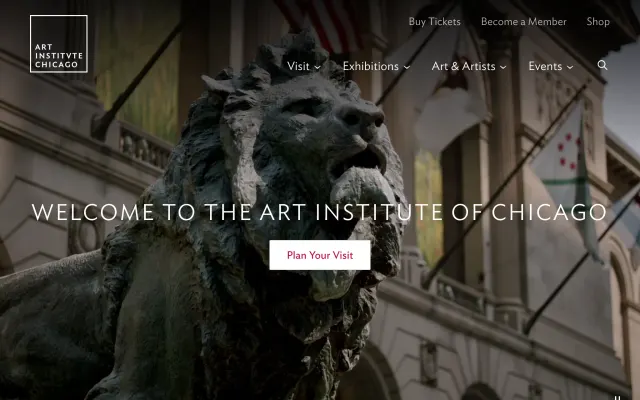
artic.edu
https://www.artic.edu
Second person: Yes. Meet by the lions at eleven?
Turn URLs into visual previews.
A link preview has two parts: a title and description, which the page publishes in its HTML, and a picture. For the picture you can use the image the publisher chose, if there is one, or take a screenshot of the page itself. The screenshot is the part urlshot.io does.
- Your codeA link is sharedIn a message, a comment, a record
- Your codeYour serverChecks its own cache for the URL
- urlshot.ioRender the pageAt a link card’s shape
- Your codeStore the imageKeyed by the URL
- Your codePreview cardThe picture, the domain, your title
Render in the background
A screenshot takes a few seconds. Save the message first and add the preview when it is ready, as chat apps do.
Everyone sees the public page
The renderer is an anonymous visitor with a fresh browser. A link to a private document previews as its sign-in page, as it would for anyone without access.
Unsafe links are refused
If your own servers open shared links, a link to an internal address loads inside your network. urlshot.io refuses private and cloud-metadata addresses, and checks every redirect.
Where link previews are useful.
Messaging and team chat
A link in a busy channel gets opened when people can see where it leads before they click.
Project management tools
Links to designs, staging sites and competitors’ pages in a ticket show their state without opening each one.
CRMs
A prospect’s website pasted into a deal shows who they are to the next person who opens the record.
Bookmark and research apps
A collection of saved links reads as a visual library rather than a column of URLs.
Knowledge bases and wikis
Pages that link out to vendors, specifications and references are easier to follow when every link shows its destination.
Content platforms and newsletters
An editor pastes a link and gets a card that looks like the page, even when the page publishes no preview image.
Directories
A submitted site gets a preview the moment it is added, without asking the submitter for a screenshot.
Showing whole sites in a grid rather than links in a conversation? Website thumbnails covers sizing a capture for a card and storing it.
Screenshot vs Open Graph preview.
Most link previews come from Open Graph: an og:image tag a publisher adds to the page. A screenshot comes from the page itself. They answer different questions.
| Aspect | Open Graph image | Screenshot |
|---|---|---|
| Where it comes from | Tags the publisher wrote into the page’s HTML | The page itself, rendered in a browser |
| What it shows | An image the publisher chose, often one for the whole site | That page, as it looked when captured |
| When a page has none | No image: the card falls back to text or an icon | An image whenever the page loads publicly |
| How current it is | As current as the publisher keeps it | As current as your capture and your cache |
| What it costs | One request for the HTML | A browser render: one credit, and slower than reading a tag |
| Text for the card | og:title and og:description | None: read the title from the HTML yourself |
Neither is better everywhere. An Open Graph image is right when the publisher’s chosen artwork is the point, as with a news article or a video. A screenshot is right when the page’s current state is the point: a status page, a staging site, a design in review, a listing whose price changes. It is also the only picture there is for the many pages that publish no Open Graph image at all.
So most apps use both: the publisher’s image when there is one, the page when there isn’t.
// findOpenGraphImage() stands for whatever your app already
// uses to read a page's og:image tag.
async function previewImage(link) {
  // Use the image the publisher chose, when there is one...
  const ogImage = await findOpenGraphImage(link);
  if (ogImage) return ogImage;

  // ...and a picture of the page itself when there isn't.
  return capturePreview(link);
}
Link preview API implementation.
Capture on your server, in a background job, and store the image with the message it belongs to:
// Called from a background job when a message containing a link is saved,
// so the person who shared it never waits for the render.
export async function capturePreview(link) {
  const params = new URLSearchParams({
    url: link,
    viewport_width: '1200',
    viewport_height: '630',
    format: 'webp',
    quality: '75',
    block_cookie_banners: 'true',
    cache_ttl: '86400',
  });

  const response = await fetch(`https://api.urlshot.io/v1/screenshot?${params}`, {
    headers: { Authorization: `Bearer ${process.env.URLSHOT_API_KEY}` },
  });

  if (!response.ok) {
    // No preview is a normal outcome: the page may be down, slow or not public.
    // Log it, and show the plain link instead.
    const { error } = await response.json();
    const { hostname } = new URL(link);
    console.warn(`No preview for ${hostname}: ${error.code} (request ${error.requestId})`);
    return null;
  }

  // A 1200 × 630 WebP: store it with the message and serve it from your CDN.
  return Buffer.from(await response.arrayBuffer());
}- 1200 × 630 is the shape link cards use. Show it at 600 × 315 and it stays sharp on high-density screens.
- A day of cache means the same link shared again within it is served for no credit. On Free, the cap is 1 hour, and a longer value is lowered to it.
- A failed capture returns null. The page was down, slow or not public, and the card shows the plain link.
Or let the reader’s browser load it
A signed URL can go straight into the card’s <img> tag, so there is nothing to store. The shared link sits in its query string, visible to anyone who can already see the message; the signing secret stays on your server.
urlshot.io records the hostname of each page it captures, never the full URL, because a link’s query string often carries a token. See the privacy policy.
// signedUrl() is the function from the signed URL guide,
// https://urlshot.io/docs/#signed-urls
const src = signedUrl({
  url: link,
  viewport_width: '1200',
  viewport_height: '630',
  format: 'webp',
  cache_ttl: '86400',
});

// In the card:
// <img src="${src}" width="600" height="315"
// loading="lazy" alt="Preview of ${hostname}">Link preview questions.
How can I generate a visual preview from a URL?
Send the URL to a screenshot API from your server, at the shape your preview card uses, and store the image with the message or record. viewport_width=1200 and viewport_height=630 give the 1.91:1 shape link cards use. The example above does it in a background job and returns nothing when the page cannot be captured.
What is the difference between a screenshot preview and an Open Graph preview?
An Open Graph preview shows an image the publisher chose and tagged in the page’s HTML, often one for a whole site, and it is missing when they didn’t add one. A screenshot preview shows the page itself as it looks now. Many apps use the Open Graph image when there is one and a screenshot when there isn’t.
Does urlshot.io return the page title or description?
No. It returns the image only. Read the title and description from the page’s <title> and Open Graph tags, which your app can fetch with one HTTP request, and use the screenshot as the picture.
What size should a link preview image be?
Link cards generally use a 1.91:1 image, the shape of a 1200 × 630 Open Graph image. Capture at that viewport and show it at 600 × 315, which is sharp on high-density screens. Use WebP to keep each preview small.
What happens if the linked page does not load?
The API returns a JSON error with a code, such as navigation_failed or render_timeout, instead of an image. Show the plain link. A render that failed after the browser started still costs one credit; a request rejected before rendering, such as one with an invalid URL, costs nothing.
Related use cases.
Website thumbnails
Show what a site looks like next to its name: in a directory, a bookmark list, a CRM record or a dashboard.
Or see every use case, or the same requests in your own language in the code examples.
Build website previews with urlshot.io.
100 free screenshots a month, to build and test link previews before you pay for anything.